PID parameters setup tutorial for RadioLink CrossRace Pro, CrossRace, CrossFlight-CE, CrossFlight, Mini Pix controlled the racing drone
1. PID Setup
Configuration for this tutorial introduction:
Frame: 210mm
Motor: EMAX RS2205 2300KV
ESC: BLHELIS 30A(brake turn on)
Battery: 4S 1500mAh
Flight Controller: RadioLink CrossRace Pro, CrossRace, CrossFlight-CE, CrossFlight, Mini Pix
Weight: 602 gram(including battery, mini M8N GPS TS100, camera, image transmission, receiver and wires)
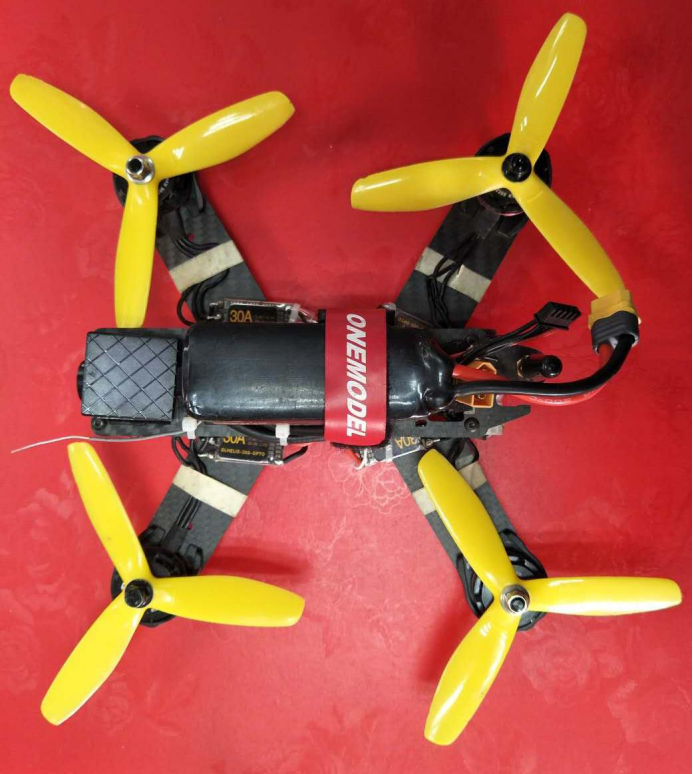

Stabilize Mode, X frame. Have to finish all the calibration steps
Connect Mini Pix to the computer, and set parameters in Mission Planner
Find CONFIG/TUNING and set PID parameters as steps below
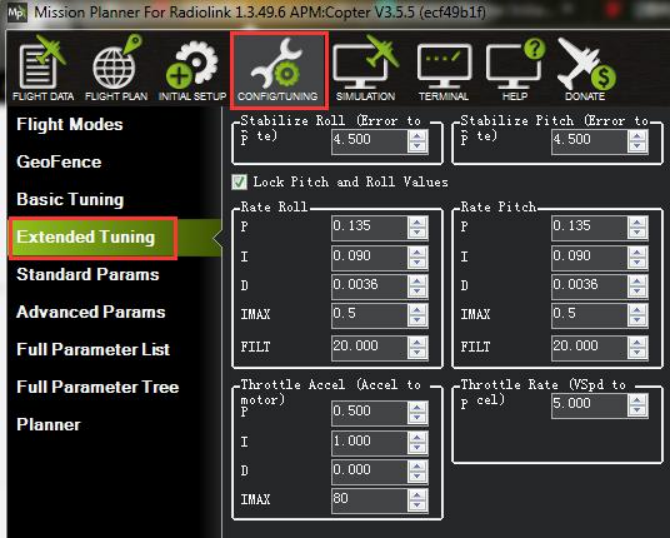

Original PID as below:
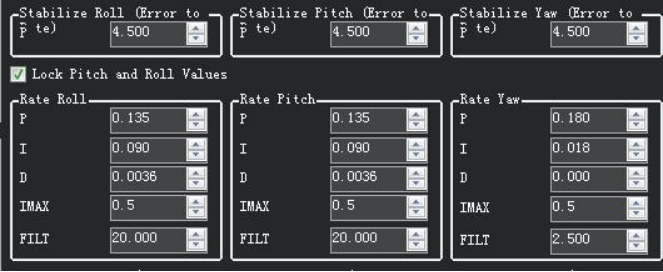

The racing drone will shake fiercely and will sky up suddenly with the original parameters.
This phenomenon is because both parameters P and D are too high.
It’s suggested to modify parameters in Full Parameter List because there must be cannot set up all the
parameters in Extended Tuning.
You can set these steps:
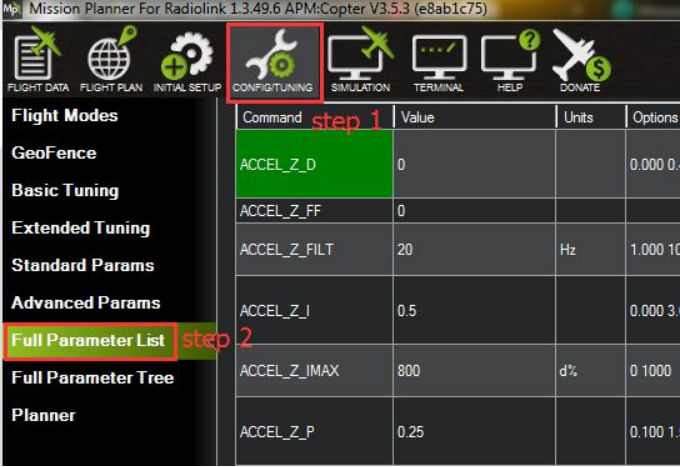
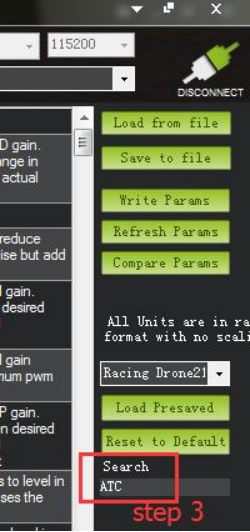

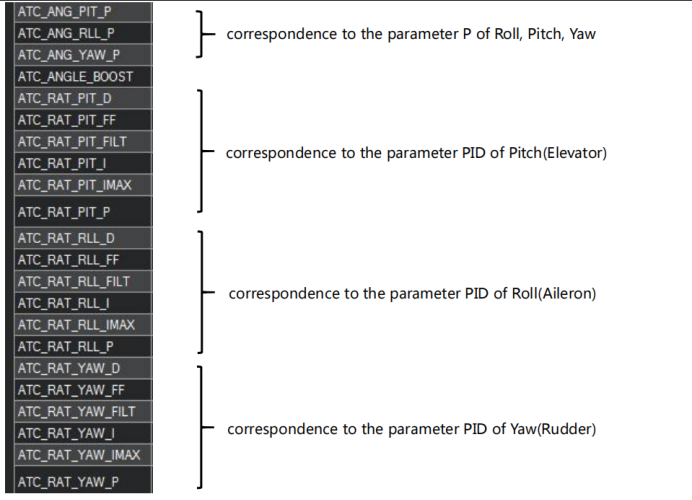


Find out the corresponding parameters and then set them.
The final Parameters for 210 racing drones are set as below:
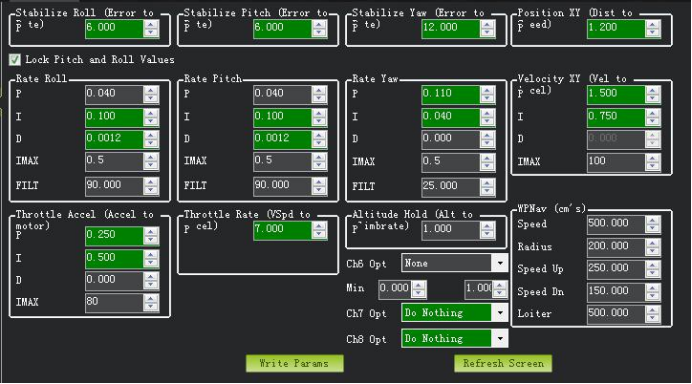

You can also download from the mission planner directly as these steps:
Step1: choose CONFIG/TUNING
Step2: choose Full Parameter Tree
Step3: choose “Racing210(穿越机)-1.param”--click Load Presaved--click Write Params--click Load Presaved
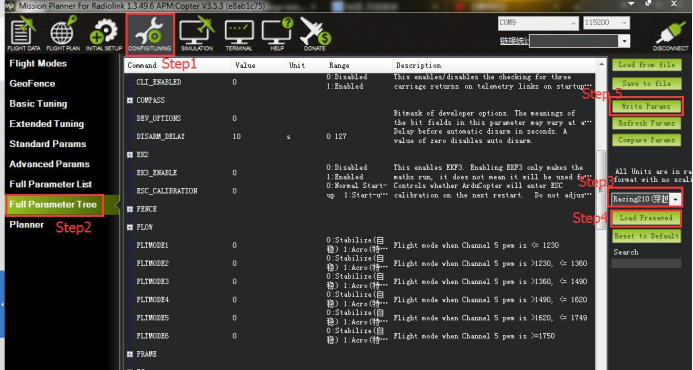

Setting Details as Steps Below
We have tried many times before getting the perfect parameters. P, I, D have considered separately to
find out the best value for the sample racing drone. Setting the steps as below, you can find out the perfect
value as these steps when you use CrossRace/CrossFlight/Mini Pix for other frame drones.
1.1 Parameter P setup
First, have to find out the suitable numerical value of P, set the parameter I as the minimum value and parameter D as zero.
You can set the rate of Roll and Pitch to the 1/4 of original parameter P and set the rate of Yaw to the
half of the original parameter P.
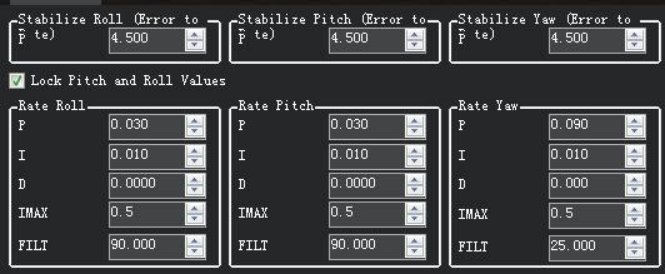

You can find out the Roll and Pitch is still not normal at this time.
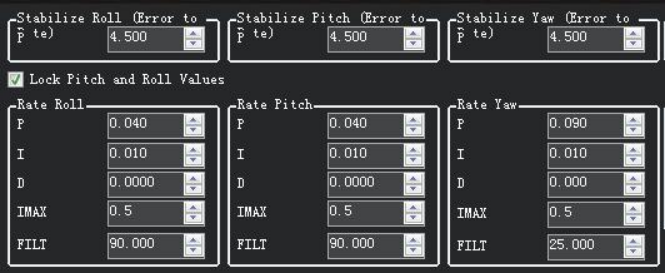
Change the parameter P, add 0.01 every time till 1/3 of the original parameter to check the attitude of the drone, if still cannot fly smoothly then add 0.005 every time till the drone can fly perfectly.

1.2 Parameter D setup
Setup parameter D after parameter P has been determined, parameter D will make your drone more stabilized.
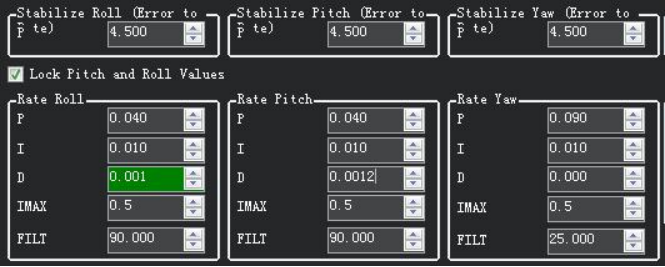
Add parameter D value from 0.0000 and then 0.0005 every time till get the perfect value.
For 210 frame racing drone, it may vibrate frequency and you can hear some sounds when the parameter D is higher than 0.0015. Then, you have to lower the parameter D.
The drone will be very stable when flying and the voice will be very clear(you can hear A loud voice that regulates speed, without any noise).

1.3 Parameter D setup
Parameter I is not have such an obvious effect relative to P and D. Parameters I can improve the precision
of stability and also improve the response of the racing drone when moving the sticks at a super speed.
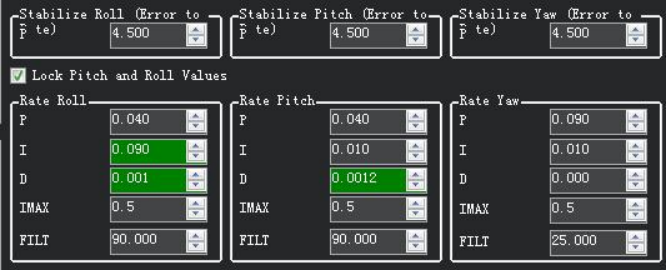

1.4 PID parameters suggested for 210 racing drone

This parameter list is compatible with most of the 210 racing drones, or you can set these steps and then find out the best parameters according to your drones, but the method is the same.
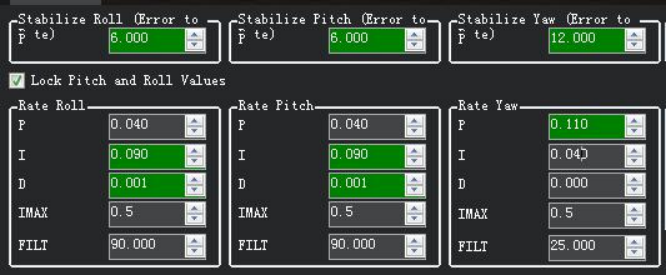
2. AltHold
CrossRace/CrossFlight/Mini Pix has built-in a barometer and vibration-damping software.
RadioLink Mini Pix, with shell completely closed to protect, the interaction effects of air current wake on air pressure when flight. The main board has an air pressure vent to ensure the accuracy of the barometer testing. Shell design and vibration damping by software make it achieve a better Altitude Hold effect.
If you fly in AltHold Mode, it will make the altitude of your drone easier to control, especially for the
RC freshman.
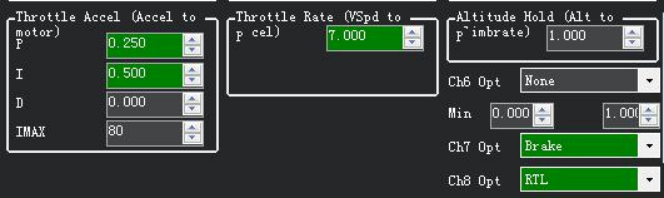
The PID of AltHold Mode also needs to set the appropriate value.
If the value of throttle acceleration is too big that will make your drone up and down vertical.
If the value of throttle acceleration is too big that will make your drone cannot be in a position.
The following parameters are available for reference

3. PosHold
PosHold function needs CneedsRace/CrossFlight/Mini Pix to work with GPS.
Please make sure that GPS has positioning more than 6 satellites, less than 1.4 meters position accuracy, and most importantly that drift velocity is less than 10 meters per second when you fly with PosHold mode.
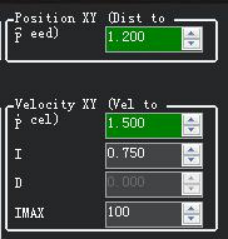
The effect of PosHold is also affected by Position PID. If the value of P is too small that may cause your drone to not keep stability while if the value of P is too big that may cause your drone will shake or drift.
The following parameters are available for reference.

4. Perfecting YAW
4.1 How to make YAW faster
You can set up parameters as these steps below if you feel the YAW is responding too slowly.
Step 1: ACRO_YAW_P is decided for the speed. Setup ACRO_YAW_P to 10 is enough, if you need to make your drone flight faster, you can set it to 15 or higher.


Step 2: ACRO_Y_EXPO is set up for the adjustment curve. The value is positive, the larger of servo value, the more obvious accelerated.


ATC_ACCEL_Y_MAX limits the maximum rate of change in angular velocity.


4.2 Max Angle of Inclination
ANGLE_MAX means the max angle of inclination for all the flight modes, and 5000 means 50 degrees.
The larger the Angle, the faster you can fly, and the more difficult it is to control.

5. Acro
Acro mode is necessary for racing drones.
You have to set it up as below when you fly with Acro Mode.
Setup ACRO_TRAINER is 0 means pure Acro Mode that only gyro helps keep stability, setup ACRO_TRAINER is 1 means your drone can back to Leveling automatically and fly in any angle, setup ACRO_TRAINER is 2 means your drone can back to Leveling automatically but the flight angle is limited.


You can change the value of the ACRO_RP_P if the speed of rotation is too slow.
ACRO_RP_P is decided as the angular velocity.


ACRO_RP_EXPO is set up for the adjustment curve. The value is positive, the larger of servo value, the more obvious accelerated. We set up 0.5 for 210 racing drones.


ATC_ACCEL_R_MAX, ATC_ACCEL_P_MAX limits the maximum rate of change in angular velocity.
You can set up a larger value of ATC_ACCEL_R_MAX, and ATC_ACCEL_P_MAX if you want the motor to go faster.

